Anoni

100% local · no telemetry · sovereign

Use AI without exposingyour documents.

Anoni detects the sensitive data in your documents and swaps it for realistic pseudonyms. The text still reads naturally for an AI, and stays reversible. Everything runs on your Mac or PC.

FreemacOS, Windows & Linux

The Anoni app reviewing an employment verification letter: every detected personal detail highlighted by category, with the detection summary on the right.

Real capture. Nothing left the machine.

For people whose documents have no business being in the cloud.

  • 100% localNothing leaves your machine.
  • No telemetryNo trackers, no usage data.
  • GDPRA local report you can keep on file.
  • SovereignDesigned and built in France.
Real example

Before, after. Drag the handle.

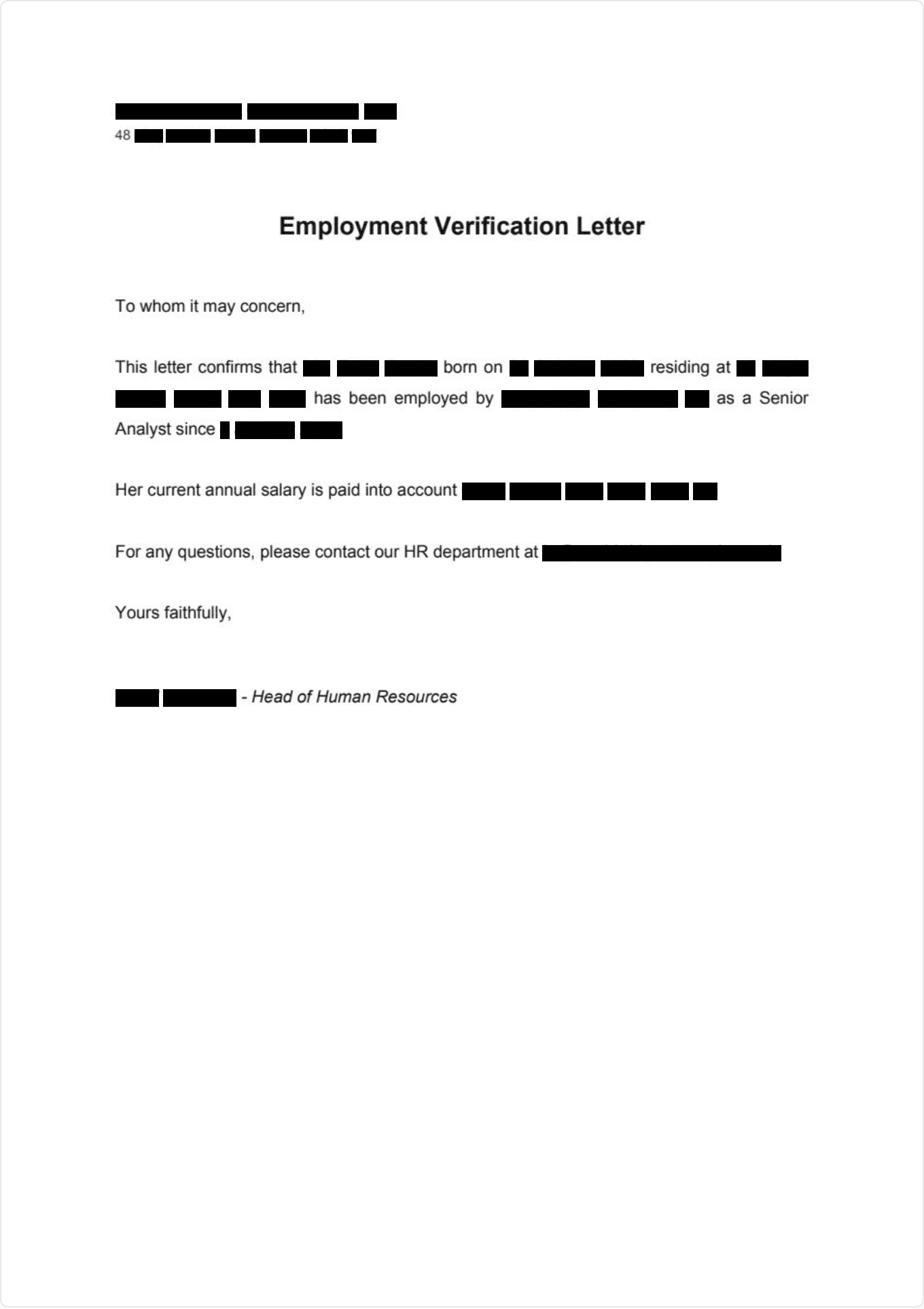
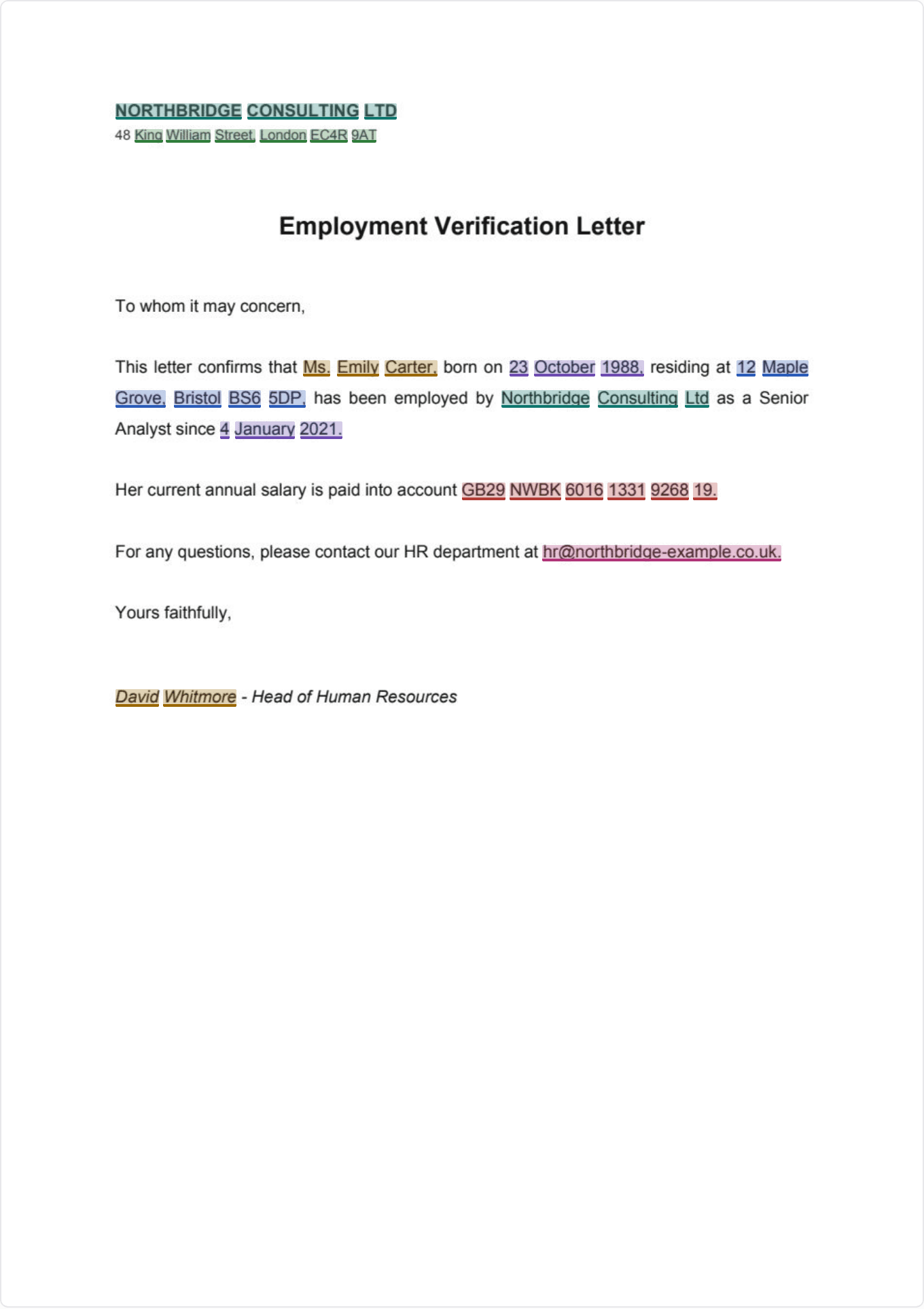
A real employment verification letter run through the app. On the left, the review with its detections. On the right, the PDF as it comes out.

The same employment letter before and after redaction: personal details highlighted by category on the left, opaque black bars on the right. The masked text is permanently removed from the PDF.
Review · 16 detectionsExported · redacted
  • Everything is caught

    Every sensitive value is detected and highlighted by category.

  • You stay in control

    Add, remove or draw your own region to redact.

  • Truly removed

    In the exported PDF the masked text is stripped from the file. Not just hidden under a rectangle.

How it works

Document → Anoni → AI → decode.

One click to anonymize, one click to decode. No copy-pasting by hand, no unreadable tokens to splice back in.

  1. 01

    Your document

    Open a PDF, DOCX, TXT or Markdown in Anoni. It doesn’t move off your machine.

  2. 02

    Anoni anonymizes

    A French model (CamemBERT) and business rules flag the sensitive data, offline. They swap it for believable fakes.

  3. 03

    ChatGPT, Claude, Copilot

    You paste the anonymized text into the AI of your choice. It sees names that look real, never yours.

  4. 04

    Decode the reply

    You paste the AI’s reply back into Decode, and Anoni puts your real data back in place, from the encrypted vault.

Jean DupontMarc LeroyThe AI reads a realistic name, not a token.
Who it’s for

For people who can’t afford a leak.

Roles bound by confidentiality or GDPR that want to put AI to work without letting their files through.

Legal

Contracts, briefs, exhibits: anonymize before the AI and privilege stays intact.

HR

Résumés, personnel files, interview notes: AI helps without seeing employee data.

Healthcare

Reports, patient letters: health data leaves before any analysis.

Public sector

Administrative files, citizen letters: a sovereign tool that stays on the machine.

Features

Made for real working documents.

Contracts, letters, HR files: Anoni anonymizes what it should. You decide the rest.

Believable fake names

“Jean Dupont” becomes “Marc Leroy”, not a token like ⟦PERSON·1⟧. The AI reads text that holds together. The vault puts everything back afterward.

Jean DupontMarc Leroy

Anonymization report (GDPR)

A PDF generated on your machine: categories, counts, exclusions, SHA-256 fingerprint, version. No personal data inside. It’s the record you file to show what was done.

CategoriesCountsExclusionsSHA-256Version

Personal dictionary

Your own always-mask list: client names, projects, internal references. Whatever model runs, they get caught.

Copy for the AI

One click: Anoni scans, replaces, copies. You paste into the AI, then paste its reply into Decode.

Redaction areas

Draw a rectangle over a signature, a stamp, a photo. In the exported PDF it’s opaque black.

Manual selection

A word slipped past detection? Select it, and it’s masked everywhere in the document.

12 types of data caught.

The French model (CamemBERT) and business rules work across your PDF, DOCX, TXT and Markdown. Local OCR handles scanned PDFs.

NamesSIRET / SIRENOrganizationsLocationsAddressesEmailsPhone numbersIBANNIRDatesSecretsOCR · scanned PDFs

Detection doesn’t replace a read-through: on a sensitive document, check behind the tool before you send it.

Security

Your documents never leave.

All the work happens on your machine. It’s not a box to tick. It’s the only way Anoni runs. Pull the Wi-Fi: nothing stops.

How security works

  • Everything stays on your machine

    Detection and anonymization run locally. No document or excerpt is sent online. Only the very first launch downloads the engine, once.

  • Reversible, but encrypted

    The mapping between fake name and real value is encrypted with AES-256-GCM, derived from your passphrase. Without it, nobody decodes. You included.

  • Two modes, your call

    Reversible pseudonymization through the vault, or plain redaction: a PDF with real black bars and no way back.

  • No trace of your usage

    One email at activation, and that’s it. No tracker, no usage stats, not a single file collected.

Transparency

Verifiable, not just promised.

When your data must not leave, a promise isn’t enough. Here’s what you can check for yourself.

  • Open detection modelsDetection runs on open models published under Apache-2.0 and MIT. You can see what reads your documents.
  • 100% local, verifiableUnplug the network: Anoni keeps anonymizing. Day to day, it needs no connection at all.
  • No telemetryNo tracker, no usage analytics, no file sent. Nothing to switch off, because there’s nothing to switch on.
  • A GDPR record to keepEvery run generates a local report: categories, counts, SHA-256 fingerprint. It contains no personal data.

99.0% of sensitive characters covered · 94.8% strict recall

See the benchmark →

The detection models are open. The Anoni app itself is not.

Frequently asked

What people ask us most.

Does my data leave my computer?

No. Detection and anonymization run entirely on your machine. No document or excerpt is sent online. Pull the Wi-Fi and see: everything keeps working.

Is Anoni GDPR-compliant?

Everything stays local and each run produces an anonymization report with no personal data, ready to keep on file. On a sensitive document, read it through first. The tool helps. It doesn’t decide for you.

Pseudonymization or redaction: what’s the difference?

Pseudonymization swaps data for believable fakes and stays reversible through the encrypted vault. Redaction masks under real black bars: once exported, it’s permanent.

Is it really free?

Yes. Every feature available today is free, no card, no subscription. Just an email. A Pro edition is being considered. What’s here stays here.

Is Anoni open source?

The app, no. But the models that do the detection are open (Apache-2.0, MIT): you can see what reads your documents.

Which systems does it run on?

macOS, Windows and Linux, with signed updates. The first launch downloads the detection engine once.

Pricing

Free, no subscription.

Every feature Anoni has today is free, no card, no subscription. A more advanced Pro edition is under consideration. What exists today stays free.

Anoni

no subscription

Free

Every current feature, free. Just an email.

  • French detection: names, SIRET / SIREN, organizations, locations, addresses, IBAN, NIR…
  • Local model (CamemBERT) and a catalog of vetted models
  • Believable fake names and a reversible encrypted vault
  • PDF redaction with black bars and manual areas
  • Personal dictionary, profiles and a local GDPR report
  • OCR for scanned PDFsFrench and English
  • macOS, Windows & Linuxsigned updates
Download

ProUnder consideration

More advanced features for the most demanding workflows. We’re thinking it through.

Learn more →

One email when Pro ships. Nothing else.

The next document you hand to an AI, run it through Anoni first.

Free, local, on Mac, PC or Linux. Your documents don’t leave your machine.

No cardno telemetry100% local